


Create Clearance Request – A summary of the activity
|
|
|
|
This activity allows you to create clearance requests for carrying out maintenance activities on an equipment or location. You can also raise a clearance request based on a work order, inspection order or a calibration order created for the equipment or the location.
Clearance refers to the process of isolating the equipment or location in order to carry out maintenance activities on it. This is essentially done to prevent personnel injury and equipment damage when maintenance activities are carried out on the equipment. A clearance request is a document requesting the clearance for carrying out maintenance activities on the equipment or location.
The person who is responsible for carrying out maintenance activities on the equipment or location raises a clearance request. The clearance request is then sent to the department to which the equipment or location belongs. This department identifies the various isolation points on the equipment or location and places tags on the isolation points to indicate that maintenance activities are carried out on the equipment or location. A clearance permit is then issued to the requesting department.
The various statuses that a clearance request attains are as follows:
Fresh on creation.
Canceled when the clearance request is canceled.
Approved, when a clearance permit is created on the basis of the clearance request.
Rejected, on rejection.
Closed, when the clearance request is closed.
The following diagram depicts the various statuses of a clearance request:
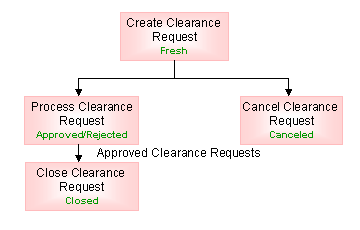
Figure Clearance request status

Getting familiar with the pages inside
|
Go to... |
For... |
|
Create Clearance Request |
|
|
Help On Clearance Request |
|
|
Help On Employee |
Help on employee |
|
Help On Equipment / Location |
Help on Equipment /Location Code |
|
View Referred Equipment / Locations |
Viewing all the equipment and locations for which clearance request or permit is created |
What you can do in this activity
You can manually create clearance requests in this activity
Go to the “Create Clearance Request” page
Create clearance requests for a specific period for equipment or locations.