


Create Clearance Permit – A summary of the activity
|
|
|
|
Clearance permit is a document that must be generated before any work is performed on equipment or location. The clearance permit describes the list of clearance activities to be performed on related equipment by Operation/Production Personnel before the equipment or location is released for maintenance activities. It will also have a list of hazards associated with the equipment or location and precautions to be taken for those hazards, by the person who is going to carry out the maintenance work.
A clearance permit is usually generated in response to the Clearance Request. It can also be automatically generated from “Work Order”, “Inspection Order” and “Calibration Order” business components for the purpose of obtaining clearance before the relevant activity must be performed.
The person responsible to carry out maintenance work raises a clearance request for equipment isolation. The issuing department identifies the various isolation points and safety requirements to be included in the permit and creates the clearance permit document. Tags are now physically placed on the isolation points by an operator of the issuing department who in turn informs his supervisor about the completion of the isolation activity. Then, the issuing authority inspects the tagging of all the listed isolation points and issues the permit to the requesting department. Before the maintenance work is started, the permit holder verifies that the clearance tags have been placed correctly on all the appropriate equipment control points.
The clearance permit is created in a “Fresh” status by a personnel of the department to which the equipment belongs, based on the clearance request that is raised by the maintenance department. It is then sent for approval to the planner who approves or rejects the clearance permit. The status of the clearance permit changes to “Approved” on approval or “Rejected” on rejection. On approval the clearance permit is sent to the permit holder who holds the permit till the maintenance work on the equipment is completed.
If the clearance permit must be extended, a request for the extension is sent to the issuing authority of the permit by the permit holder. The status of the permit changes to “WaitForExt”. If extension is granted on the permit, the status of the permit changes to “Extended”. If extension is not granted, the status of the permit changes to “ExtRejected”.
Upon the completion of work on the equipment, the permit holder returns the clearance permit to the issuing department. The status of the permit changes to “Returned”. An employee of the issuing department then inspects the equipment for satisfactory completion of the maintenance work and then removes the clearance tags from the pieces of equipment. When this is done, the Clearance Permit is closed and the clearance tags are destroyed. The status of the permit changes to “Closed”.
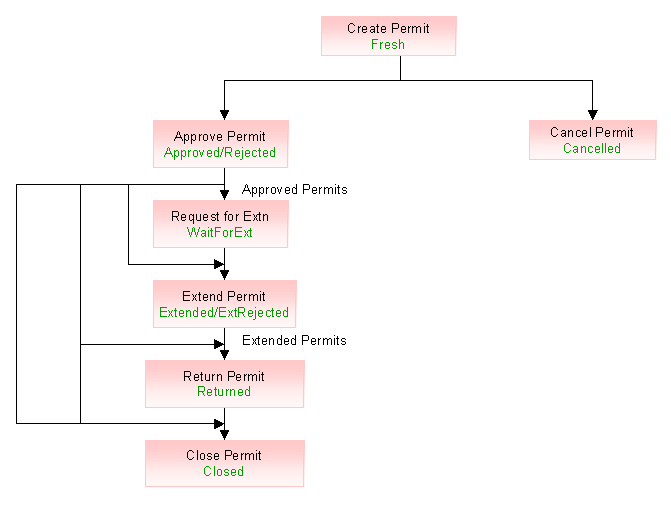
Figure Clearance permit status

Getting familiar with the pages inside
|
Go to... |
For... |
|
Create Clearance Permit |
|
|
Help on Clearance Permit |
|
|
Help On Reference Document |
|
|
Help On Employee |
Help on employee |
|
Help on LOTO Procedure |
|
|
Help on Activity |
|
|
Attach Safety Procedure |
|
|
View Clearance Details |
|
|
View Referred Equipment/Locations |
Viewing all the equipment and locations for which clearance request or permit is created |
What you can do in this activity
Attach safety procedure to the clearance permit
View all equipment and locations for which clearance permit is raised
You can create a clearance permit manually in this activity.
Go to the “Create Clearance Permit” page.
Create the clearance permit.
Attach safety procedure to the clearance permit
You can attach safety procedure to the clearance permit. A safety procedure is a collection of hazards that are likely to occur while handling equipment or location and the set of precautions that must be taken in the event of the hazard.
Use the “Attach Safety Procedure” page to attach safety procedure to the clearance permit..
You can view the clearance permits that have been created for the equipment or location.
Use the “View Clearance Details” page to view the clearance permit conflicts based on activity or on clearance permit.
View all equipment and locations for which clearance permit is raised
You can also view in this activity all the equipment and locations on which clearance permit are raised.
Use the “View Referred Equipment/Locations” page to view the other equipment and locations on which clearance permit is raised.